

Real-time identity matching
Verifies that the customer connecting the bank account is its legitimate owner
Advanced data handling
Manages variations in PII, such as typos, nicknames, and cultural naming conventions
Fraud detection
Identifies and prevents potential fraudulent activities before they occur.
Always compliant
Embeds regulatory compliance checks into the bank verification process
How Bridge creates paykeys
Bridge is Straddle’s connectivity platform that securely links customers’ bank accounts to your application. When a customer connects their bank account through Bridge, a Paykey is generated to securely represent this connection. Here’s how the process works:1
Customer identity verification
Before connecting a bank account, the customer is onboarded and their identity is verified using Straddle ID. This ensures compliance with KYC (Know Your Customer) and AML (Anti-Money Laundering) regulations.
2
Bank account connection via Bridge
Bridge Widget
Bridge Widget
The customer connects their bank account using the Bridge Widget, an embeddable interface within your application.
Third-party tokens
Third-party tokens
Alternatively, Bridge accepts existing tokens from providers like Plaid, MX, or Finicity, leveraging customers’ pre-existing bank connections.
Manual bank entry
Manual bank entry
Paykeys name matching is also possible with manual bank entry.
3
Identity matching with WALDO
is Bridge’s proprietary algorithm for verifying bank account ownership.
Data comparison
WALDO compares the customer’s verified identity with the bank account ownership details
Handling variations
The algorithm accounts for minor discrepancies, such as nicknames, middle names, typos, and cultural naming conventions.
Fraud prevention
Prevent fraudulent activities and unauthorized access to bank accounts.
Real-time processing
The verification occurs instantly in the API response
4
Paykey generation and status assignment
Unique identifier creation
Unique identifier creation
A Universally Unique Identifier (UUID) is generated to represent the link between the customer and their bank account.
Hashing and encoding
Hashing and encoding
The UUID is hashed using a cryptographic hash function (BLAKE3) to ensure it cannot be reverse-engineered. The hashed value is encoded (e.g., Base64 or URL-safe encoding) to produce the Paykey.
Paykey structure
Paykey structure
The result is a secure, unique token (the Paykey) that represents the customer-bank account linkage.
Status determination
Status determination
Based on WALDO’s verification results, the paykey is assigned an initial status:
- active
- rejected
- review (requires manual review)
5
Secure delivery of the paykey
The Paykey object is securely returned to your application. It includes the paykey, masked bank account details, the available balance, and the current verification status.
6
Storage and usage
Secure storage
Your application never has to transmit PII or bank account details to Straddle.
Payment initiation
The Paykey authorizes payments without exposing sensitive details.
Paykey object definition
The Paykey object represents a secure, tokenized link between a customer and their bank account. It is used to authorize payments without exposing sensitive financial information.Paykey attributes
Verification results
On paykey creation, Straddle performs name matching and determines whether the bank account is open and ready for transactions. The verification data Straddle uses to evaluate each paykey can be retrieved from the/paykeys/{id}/review endpoint. Use these insights to help you decide whether to accept or reject paykeys in review status, or to cancel active paykeys if needed.
Review attributes
Paykey status details
Notes
Notes
- The
account_numberin thebank_dataobject is always masked for security reasons. Use the unmasked paykey data endpoint to access the full account number when necessary and authorized. - The
balancefield is only available for certain integration types and may not always be present. - The
sourcefield indicates the method used to create the paykey, which can affect the available features and verification process. - The
metadataobject can contain up to 20 key-value pairs, each with a maximum length of 40 characters for keys and 500 characters for values. - The
created_atandupdated_atfields are automatically managed by Straddle and cannot be modified directly. - The
expires_atfield is only applicable for certain types of paykeys and integration methods. - Paykeys in
reviewstatus can be manually approved or rejected via PATCH/paykeys/{id}/review. - Use GET
/paykeys/{id}/review(or confirm if different endpoint) to retrieve verification details.
Example paykey object
Paykey verification and manual review
When a paykey is created, it goes through an automated verification process that can result in one of three decisions:Accept
Immediate ApprovalThe paykey passes all verification checks and is ready for use in payments immediately.
Review
Manual Review RequiredThe paykey has verification issues (e.g., name variations) that require human review before approval.
Reject
Verification FailedThe paykey fails verification due to significant issues and cannot be used for payments.
Verification codes and their meaning
A paykey’s verification decision and status are determined by the codes it receives during processing. If any rejection code is present, the paykey isrejected regardless of other successful verification results. Other codes result in the paykey status being transitioned to review. Paykeys that pass verification become active.
Paykeys must be in
review status to have their verification outcome modified.Review codes
Review codes
Rejection codes
Rejection codes
Manual review process
Manual paykey review gives you control over verification decisions. When a paykey has areview status, you can evaluate verification details and make informed decisions about whether to approve or reject the paykey, either through the dashboard or programmatically. This helps you prevent fraudulent accounts, manage risk, and ensure only legitimate payment methods are activated on your platform.
Name information is only available for paykeys linked through Open Banking. Paykeys connected using account and routing number don’t include account holder name data, so
name_match fields in the review response are null. Use Open Banking connections where possible to enable full name verification at review time.- Review Details: Access detailed verification information that may include names on the bank account and matched name in the dashboard or retrieve it from the
reviewendpoint. - Manual Decision: Resolve the paykey status by setting it to
activeorrejected. - Retry Verification: Optionally refresh the verification process to re-evaluate the paykey.
The review process ensures that edge cases and minor discrepancies don’t automatically reject legitimate paykeys, while maintaining security standards.
/paykeys/{id}/review endpoint.
Accept
Accept
Reject
Reject
Review
Review
Account balance updates
For accounts linked using an open banking token or Bridge, you can receive balance updates when the following events occur:- When a new Paykey is created
- When the new refresh endpoint is explicitly called, at most once per hour
- When a charge or payout is created
/paykeys/{id}/refresh_balance endpoint.
Use paykeys
Paykeys are used in place of customer and bank account details when creating charges or payouts. Here’s an example of creating a charge using a paykey:Ongoing management and unblocking
When a Paykey is blocked (e.g., R29), your customer can’t pay or get paid until it’s fixed. Unblock in the Dashboard once they’ve updated their bank settings, with no support wait, so they can use the Paykey again quickly. View blocked Paykeys in the Overview tab or manage them directly from the specific Customer page.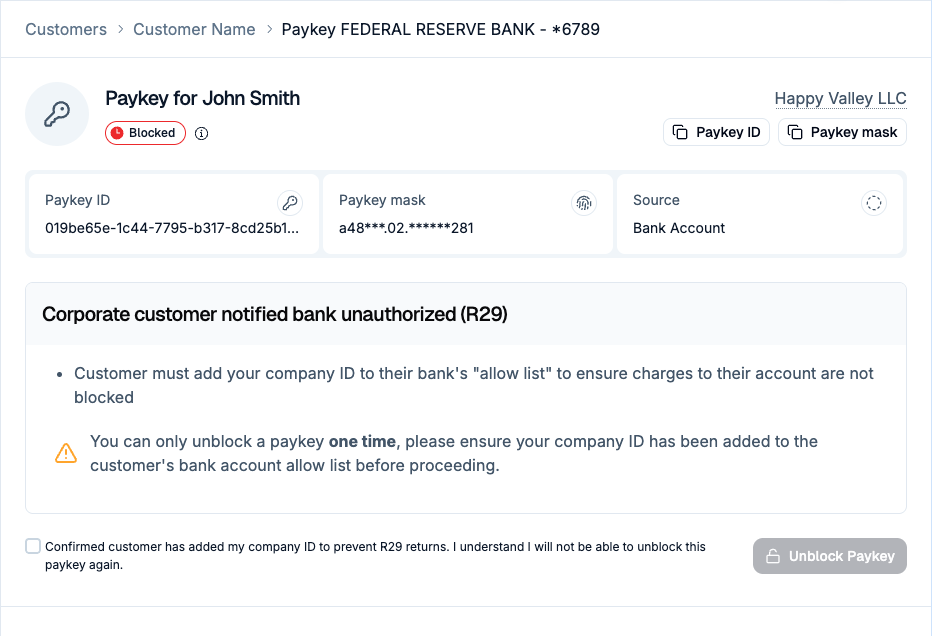
PATCH /v1/paykeys/{id}/unblock endpoint to programmatically reactivate eligible Paykeys.
Handle R29 returns
Corporate “positive pay” blocks often cause R29 returns; you can now confirm the customer has added your ACH identifier to their approved list and select “Unblock Paykey” in the Dashboard.Benefits of paykeys
For businesses
Reduced fraud losses
Prevent unauthorized account use and save on potential fraud-related losses.
Regulatory compliance
Simplify adherence to KYC and AML regulations.
Operational efficiency
Automate identity matching, reducing the need for manual reviews while providing human oversight for edge cases.
Improved customer trust
Enhance reputation by ensuring secure transactions.
For customers
Security
Protect customers from unauthorized use of their bank accounts.
Convenience
Eliminate the need for additional verification steps in most cases.
Privacy
Ensure personal data is handled securely and used appropriately.
Confidence
Build trust in the platform’s ability to protect financial information.