> ## Documentation Index
> Fetch the complete documentation index at: https://docs.straddle.com/llms.txt
> Use this file to discover all available pages before exploring further.
# 2026 changelog and product updates
> Product updates, new features, and platform announcements for the Straddle ACH payments and identity verification platform throughout 2026.
# We build for you.
**Alerts and notifications widget**
A new widget sits at the top of the [Straddle Dashboard](https://dashboard.straddle.com) and surfaces what needs your attention. Two tabs separate action-required *Alerts* from informational *Notifications*, and every row deep-links to the page where you can investigate or resolve. See the [dashboard walkthrough](https://help.straddle.com/article/how-to-use-the-alerts-and-notifications-widget-in-the-dashboard) for the full event catalog and what each tab looks like in practice.
 **Email notifications**
The same events also land in your inbox. Add one or more [mailboxes](https://help.straddle.com/article/how-to-set-up-email-notifications-in-the-dashboard) (for example `ops@yourcompany.com`) on any account, and Straddle delivers email notifications there for charge failures, items under review, blocked paykeys, and completed charges, payouts, and funding events. No webhook handler required.
**Email notifications**
The same events also land in your inbox. Add one or more [mailboxes](https://help.straddle.com/article/how-to-set-up-email-notifications-in-the-dashboard) (for example `ops@yourcompany.com`) on any account, and Straddle delivers email notifications there for charge failures, items under review, blocked paykeys, and completed charges, payouts, and funding events. No webhook handler required.
 Refund a successfully paid [charge](https://straddle.dev/api-reference#tag/charge/POST/v1/charges/\{id}/refund) directly from the dashboard or API. Refunds return funds to the customer's original bank account and link back to the source charge via [`related_payments`](/guides/payments/statuses#refund-paid-charges) for clean reconciliation. Partial and full refunds are both supported; one refund per charge. See the [step-by-step dashboard walkthrough](https://help.straddle.com/article/how-to-refund-a-paid-charge-in-the-dashboard).
 **Get account settings via API**
Programmatically retrieve the settings for any account using the new [GET /v1/account\_settings/\{account\_id}](https://docs.straddle.com/api-reference/accounts/account-settings) endpoint. Pull configuration details directly into your own tools and dashboards without manual lookups.
**Resubmit endpoints in the API reference**
Dedicated API reference pages are now live for resubmitting [charges](https://docs.straddle.com/api-reference/charges/resubmit) and [payouts](https://docs.straddle.com/api-reference/payouts/resubmit), making it easier to integrate retry logic for failed, reversed, or cancelled payments while preserving the original bank and payment details.
You can now quickly [resubmit](/guides/payments/statuses#resubmit-failed-payments) failed, reversed, or cancelled [charges](https://straddle.dev/api-reference#tag/charge/POST/v1/charges/\{id}/resubmit) or [payouts](https://straddle.dev/api-reference#tag/payout/POST/v1/payouts/\{id}/resubmit) while automatically preserving their original bank and payment details.
**Self-Service Capabilities and Limit Management**
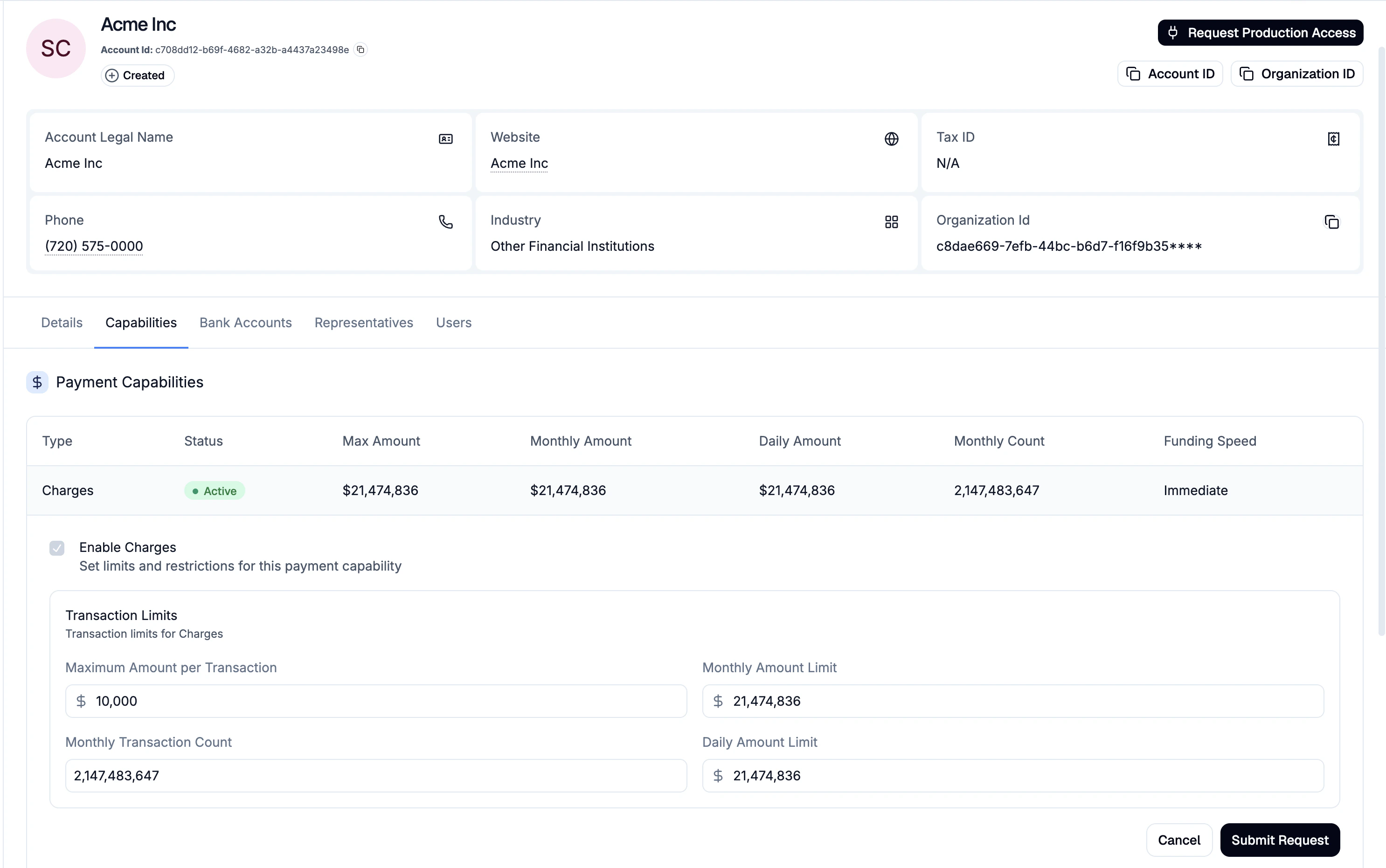
Account holders can now view, configure, and request changes to their payment capabilities and transaction limits directly from the dashboard or via API request, no support ticket required.
**Get account settings via API**
Programmatically retrieve the settings for any account using the new [GET /v1/account\_settings/\{account\_id}](https://docs.straddle.com/api-reference/accounts/account-settings) endpoint. Pull configuration details directly into your own tools and dashboards without manual lookups.
**Resubmit endpoints in the API reference**
Dedicated API reference pages are now live for resubmitting [charges](https://docs.straddle.com/api-reference/charges/resubmit) and [payouts](https://docs.straddle.com/api-reference/payouts/resubmit), making it easier to integrate retry logic for failed, reversed, or cancelled payments while preserving the original bank and payment details.
You can now quickly [resubmit](/guides/payments/statuses#resubmit-failed-payments) failed, reversed, or cancelled [charges](https://straddle.dev/api-reference#tag/charge/POST/v1/charges/\{id}/resubmit) or [payouts](https://straddle.dev/api-reference#tag/payout/POST/v1/payouts/\{id}/resubmit) while automatically preserving their original bank and payment details.
**Self-Service Capabilities and Limit Management**
Account holders can now view, configure, and request changes to their payment capabilities and transaction limits directly from the dashboard or via API request, no support ticket required.
 **Request Limit Increases**
From the Capabilities tab on an [Account](https://dashboard.straddle.com/accounts) page or [Company Profile](https://dashboard.straddle.com/company-profile), you can now request changes to account limits. Adjustable fields include `max_amount`, `daily_amount`, `monthly_amount`, and `monthly_count`. Submitted requests enter a compliance review workflow, and you'll be notified once a decision is made.
**Enable New Capabilities**
Request activation of additional payment types, customer types, and consent types from the same capabilities tab. You can also configure signed agreement settings to require formal contracts for high-value transactions.
**API Support**
Use the [POST /v1/accounts/capability\_requests](https://docs.straddle.com/api-reference/capabilityrequests/create) endpoint to programmatically request capability changes.
**Funding Event CSV Export**
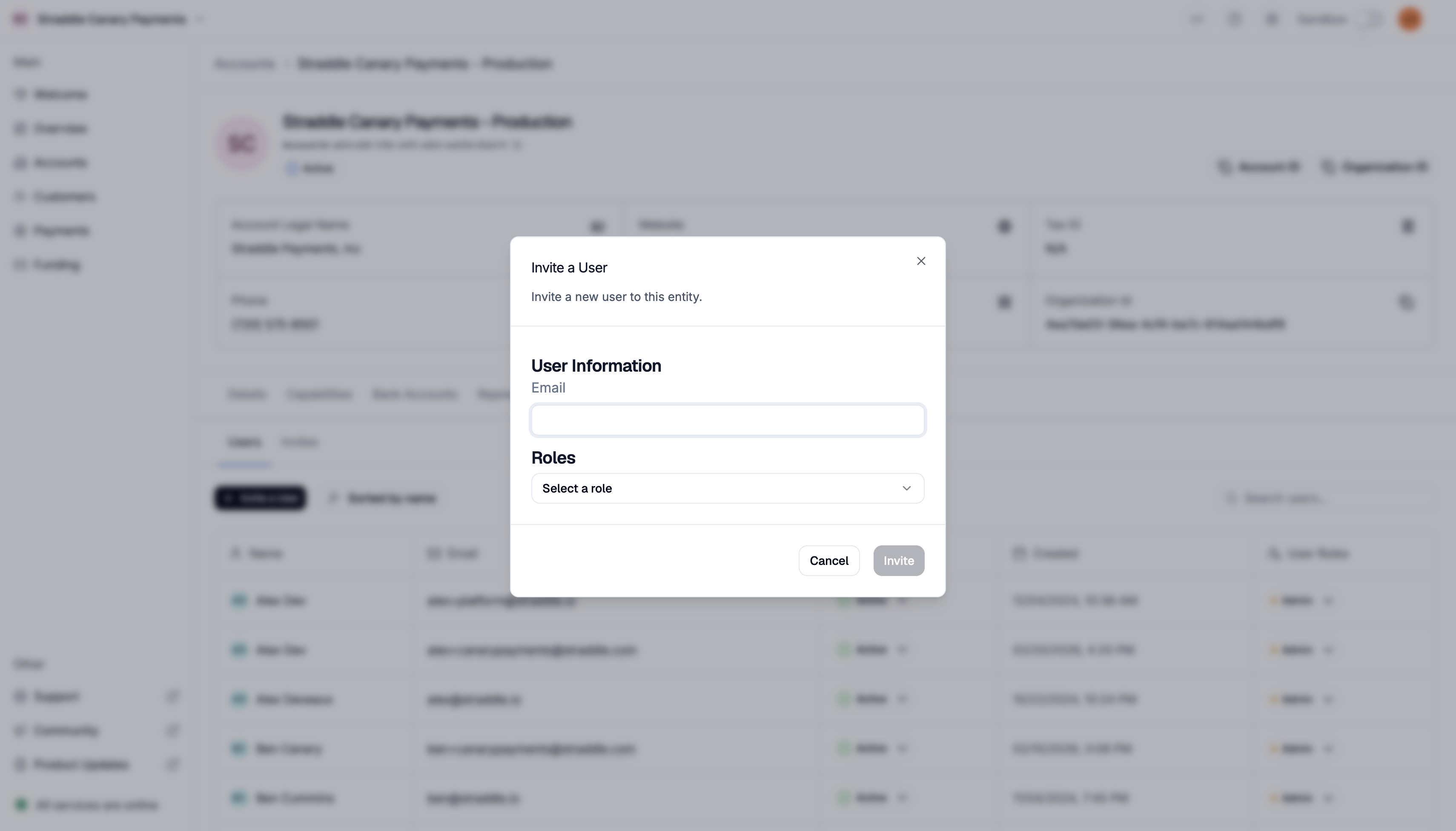
You can now export a full breakdown of any funding event directly from the [dashboard](https://dashboard.straddle.com/funding). Request a CSV from the funding event details page and receive an itemized report in your inbox.
**Request Limit Increases**
From the Capabilities tab on an [Account](https://dashboard.straddle.com/accounts) page or [Company Profile](https://dashboard.straddle.com/company-profile), you can now request changes to account limits. Adjustable fields include `max_amount`, `daily_amount`, `monthly_amount`, and `monthly_count`. Submitted requests enter a compliance review workflow, and you'll be notified once a decision is made.
**Enable New Capabilities**
Request activation of additional payment types, customer types, and consent types from the same capabilities tab. You can also configure signed agreement settings to require formal contracts for high-value transactions.
**API Support**
Use the [POST /v1/accounts/capability\_requests](https://docs.straddle.com/api-reference/capabilityrequests/create) endpoint to programmatically request capability changes.
**Funding Event CSV Export**
You can now export a full breakdown of any funding event directly from the [dashboard](https://dashboard.straddle.com/funding). Request a CSV from the funding event details page and receive an itemized report in your inbox.
 **Unified Login**
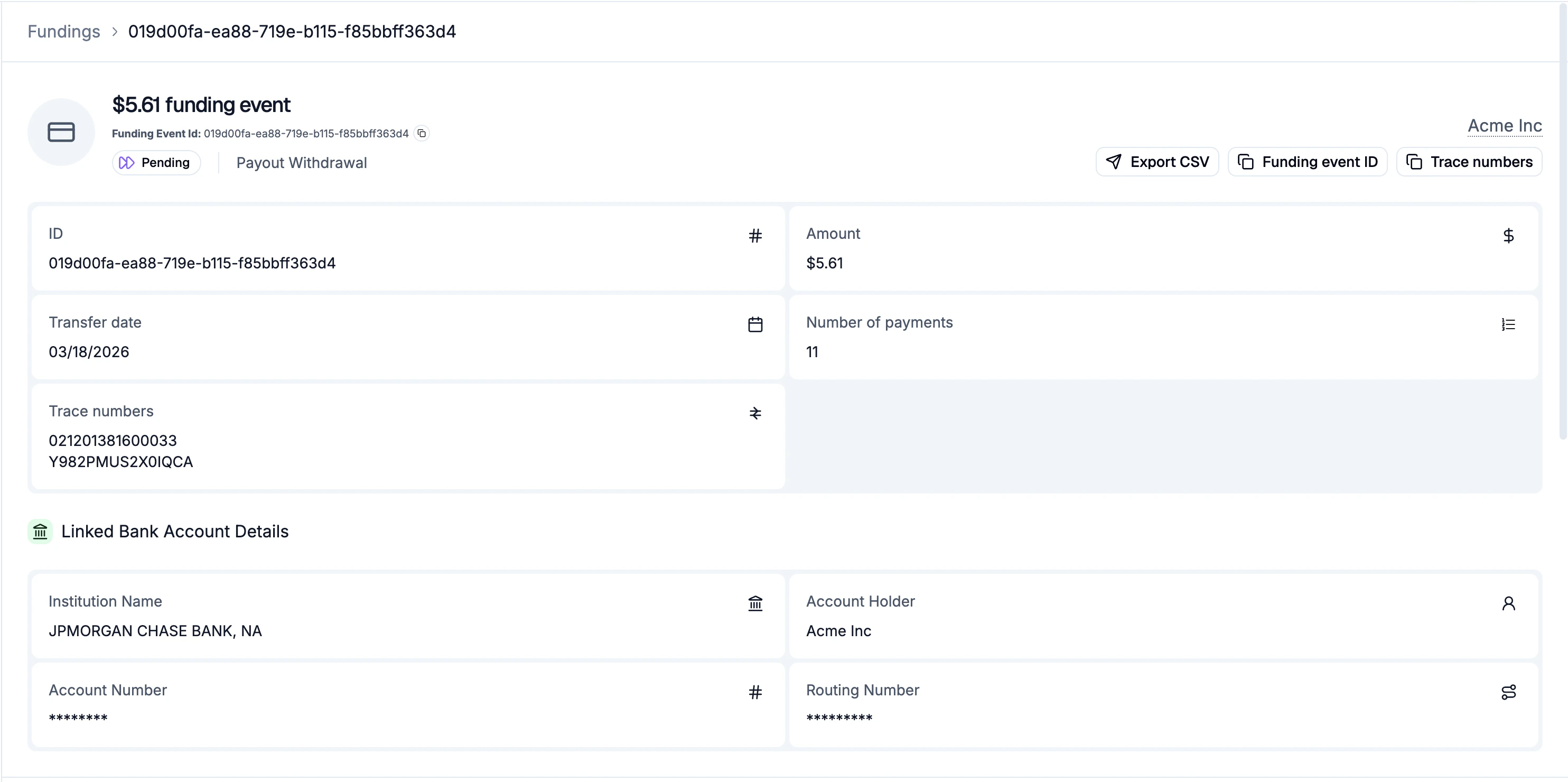
Access all your organizations with a single login. Seamlessly switch between them to streamline your payment operations without the hassle of managing multiple credentials.
**Unified Login**
Access all your organizations with a single login. Seamlessly switch between them to streamline your payment operations without the hassle of managing multiple credentials.
 **User Invites for Platforms**
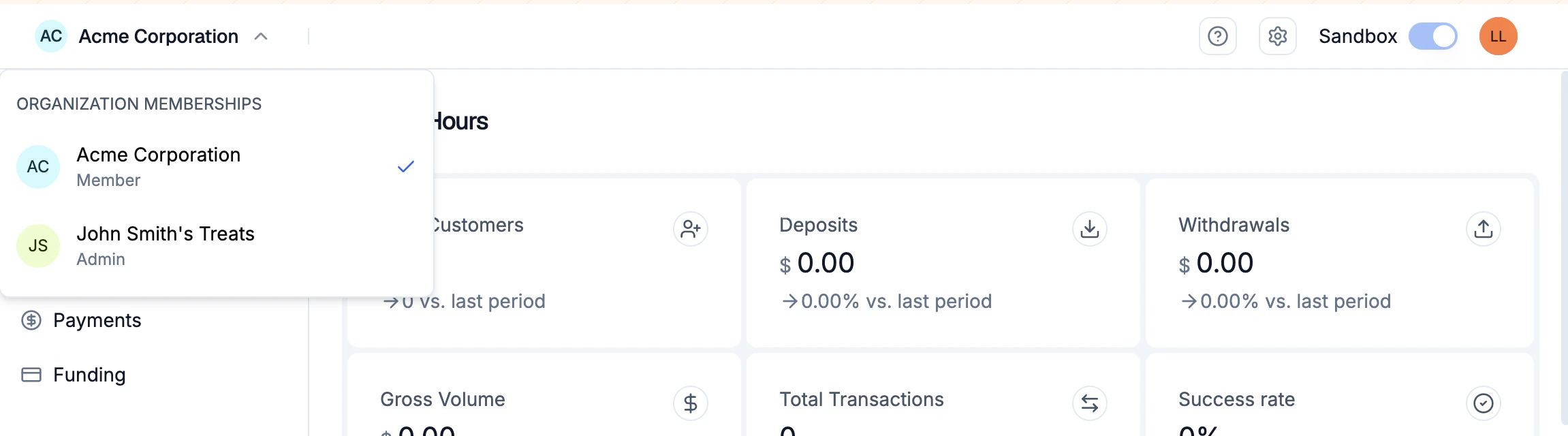
Platform admins can now invite users to organizations directly, no support ticket required. Just head to the [Accounts](https://dashboard.straddle.com/accounts) tab, select an account, and send an invite from the Users tab.
**User Invites for Platforms**
Platform admins can now invite users to organizations directly, no support ticket required. Just head to the [Accounts](https://dashboard.straddle.com/accounts) tab, select an account, and send an invite from the Users tab.
 **Introducing Straddle Ledger**
Meet the Straddle Ledger: a centralized, double-entry system built for modern finance. Get real-time visibility into every charge, payout, return, and exception with faster fund access, same-day payout capabilities, and clearer bank statements. Every state change, tracked. Every dollar, accounted for.
**Faster Liquidity**
The Straddle Ledger uses the earliest processing windows to speed up funding timelines. If using same-day ACH windows, charges post to the customer's account the same day which speeds up your funding by a day.
**Efficient Payouts**
Payouts now qualify for same-day funding when submitted by the [first same-day ACH window](https://help.straddle.com/article/same-day-ach-vs-standard-ach-cut-off-times#ach-cut-off-times). To take advantage of this, ensure your account is enabled for 'immediate' funding or contact [compliance@straddle.com](mailto:compliance@straddle.com) to request this capability.
**Clearer Bank Statements**
[Payment descriptions](https://docs.straddle.com/guides/payments/charges#param-description) now appear on bank statements with up to 80 characters of detail helping customers recognize charges at a glance.
**Real-Time Funding Visibility**
Know the moment your money moves. Funding event webhooks fire as soon as status changes and you see updates immediately in the dashboard.
**Under the Hood**
The Straddle Ledger is built for zero double-spends, always-correct balances, and real-time balance limits enforced at the ledger level. It's multi-cloud with self-healing failover, 6 replicas for consensus, and an immutable audit trail baked in from day one.
**What’s Next**
This architecture is the foundation for stored value wallets, multi-currency (including crypto), infinite accounts, and direct-to-rail payments. This is just the beginning.
**Recover Blocked Paykeys Instantly**
When a paykey is blocked (e.g. R29), your customer can't pay or get paid until it's fixed. Unblock in the dashboard once they've updated their bank settings so they can use the paykey again quickly. Note that you can only unblock a paykey once.
View blocked paykeys in the [Overview](https://dashboard.straddle.com/) tab or manage them directly from the specific [Customer](https://dashboard.straddle.com/customers) page.
**Introducing Straddle Ledger**
Meet the Straddle Ledger: a centralized, double-entry system built for modern finance. Get real-time visibility into every charge, payout, return, and exception with faster fund access, same-day payout capabilities, and clearer bank statements. Every state change, tracked. Every dollar, accounted for.
**Faster Liquidity**
The Straddle Ledger uses the earliest processing windows to speed up funding timelines. If using same-day ACH windows, charges post to the customer's account the same day which speeds up your funding by a day.
**Efficient Payouts**
Payouts now qualify for same-day funding when submitted by the [first same-day ACH window](https://help.straddle.com/article/same-day-ach-vs-standard-ach-cut-off-times#ach-cut-off-times). To take advantage of this, ensure your account is enabled for 'immediate' funding or contact [compliance@straddle.com](mailto:compliance@straddle.com) to request this capability.
**Clearer Bank Statements**
[Payment descriptions](https://docs.straddle.com/guides/payments/charges#param-description) now appear on bank statements with up to 80 characters of detail helping customers recognize charges at a glance.
**Real-Time Funding Visibility**
Know the moment your money moves. Funding event webhooks fire as soon as status changes and you see updates immediately in the dashboard.
**Under the Hood**
The Straddle Ledger is built for zero double-spends, always-correct balances, and real-time balance limits enforced at the ledger level. It's multi-cloud with self-healing failover, 6 replicas for consensus, and an immutable audit trail baked in from day one.
**What’s Next**
This architecture is the foundation for stored value wallets, multi-currency (including crypto), infinite accounts, and direct-to-rail payments. This is just the beginning.
**Recover Blocked Paykeys Instantly**
When a paykey is blocked (e.g. R29), your customer can't pay or get paid until it's fixed. Unblock in the dashboard once they've updated their bank settings so they can use the paykey again quickly. Note that you can only unblock a paykey once.
View blocked paykeys in the [Overview](https://dashboard.straddle.com/) tab or manage them directly from the specific [Customer](https://dashboard.straddle.com/customers) page.
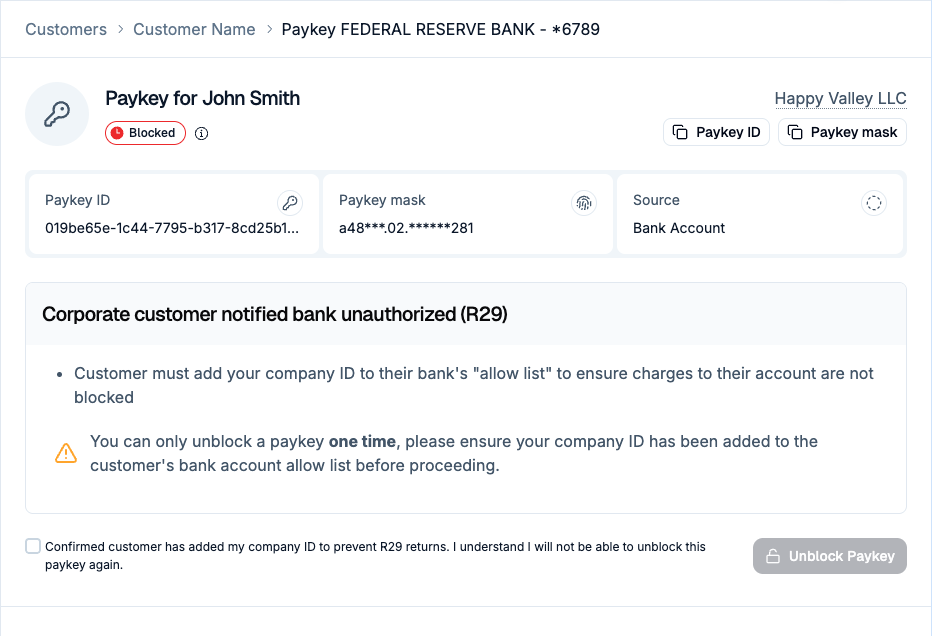 **API Support for Unblocking**
Use the new [PATCH /v1/paykeys/id/unblock](https://straddle.dev/api-reference#tag/paykeys/PATCH/v1/paykeys/\{id}/unblock) endpoint to programmatically unblock eligible paykeys.
**Handling R29 Returns**
Corporate "positive pay" blocks often cause R29 returns; you can now confirm the customer has added your ACH identifier to their approved list and click Unblock Paykey in the dashboard.
**API Support for Unblocking**
Use the new [PATCH /v1/paykeys/id/unblock](https://straddle.dev/api-reference#tag/paykeys/PATCH/v1/paykeys/\{id}/unblock) endpoint to programmatically unblock eligible paykeys.
**Handling R29 Returns**
Corporate "positive pay" blocks often cause R29 returns; you can now confirm the customer has added your ACH identifier to their approved list and click Unblock Paykey in the dashboard.